
Desk Chair Ergonomics: Your Complete Setup Guide

After a long day at the desk, the first thing many people notice isn't the chair itself. It's the tight shoulders, the lower back that feels compressed, and the way the body seems to ask for a stretch the moment the laptop closes. That's usually the point when desk chair ergonomics stops feeling like a design term and starts feeling personal.
A good chair doesn't just look supportive. It fits the body, supports the lower back, and gives the user room to move without fighting the frame. That matters in a home office, a spare bedroom setup, or a full-time work corner anywhere in the Greater Albany Capital Region, including Freehold, Albany, Schenectady, and Troy.
Why Your Chair Matters More Than You Think
By the end of the workday, the chair has already done hours of quiet work. It held the body through emails, calls, spreadsheets, and every small shift in posture that happened between them. When the chair fits poorly, those hours don't disappear. They show up as stiffness, fatigue, and the kind of discomfort that makes even a short evening task feel longer than it should.
That's why chair choice is never just about softness. Desk chair ergonomics is the practice of shaping the chair to the person, not forcing the person to adapt to the chair. In a showroom, that difference is easy to feel. The right seat lets the hips settle, the lower back stay supported, and the shoulders relax instead of bracing.
A chair is often the most-used tool in a home office, and unlike a desk lamp or monitor stand, it touches the body all day long. When that contact point is off, the mismatch builds. A seat that feels fine for ten minutes can become the source of a sore back after hours of sitting.
Practical rule: if the body keeps shifting to escape a chair, the chair is already doing too little in the wrong places.
That's why shoppers in Freehold and the Capital Region often benefit from testing chairs in person, not just reading features online. It's easier to tell what support feels like when the body is sitting in it. A good first test is simple, the feet should land naturally, the lower back should feel held, and the user should be able to sit without hunching.
What Desk Chair Ergonomics Means
At its simplest, desk chair ergonomics means the chair fits the body's shape and movement. A chair works like a tailor fitting a suit. The suit can be beautifully made, but if the shoulders pull, the sleeves ride up, or the waist is wrong, it does not fit the person wearing it. A chair behaves the same way.
The main idea is support without rigidity. The chair should help the spine stay in a more neutral position, while still allowing posture to change through the day. That is why adjustable parts matter so much. They let one chair work for different heights, different leg lengths, and different ways of sitting, whether someone leans in for focused work or sits back for a short reset.
A showroom test makes this easier to understand. Sit down, let the feet land where they naturally reach, and notice whether the lower back feels held without feeling pinned in place. If the chair forces the shoulders upward or makes the thighs feel crowded, the fit is off even if the chair looks correct from the outside.
The four features that matter most
A practical ergonomic chair usually comes down to four things.
- Lumbar support. The lower back needs help keeping its natural curve, especially during longer stretches of sitting.
- Adjustability. Height, depth, arms, and tilt should move with the user, not stay locked in one position.
- Seat geometry. The seat has to support the thighs without pressing behind the knees or forcing the pelvis into a bad angle.
- Movement variety. A chair should make small changes easy, because staying frozen is usually what causes the body to complain.
Static chairs often fail because they assume one posture fits every person. Real bodies do not work that way. Some people have longer thighs, some sit more upright, and some need a brief recline to recover between focused tasks. Adjustable seating respects those differences, and a showroom floor makes them obvious fast because the body gives instant feedback.
For shoppers comparing home office setups, the right starting point is a category like ergonomic home office furniture. It keeps the focus on fit, not just appearance. If foot discomfort is also part of the picture, it can help to find relief for foot-driven back pain while testing how chair height, seat depth, and floor contact work together. Once the body fits the chair, the rest of the workspace becomes easier to fine-tune.
The Hidden Cost of Long Sitting Hours
A chair can feel harmless while you are using it. That is what makes long sitting hours easy to ignore. A standard workday can add up to 2,000 hours per year in a chair for an 8-hour-a-day office user according to the ergonomic chair data summary. The same data summary also cites a year-pattern of longer daily sitting that reaches roughly 17,000 hours of chair exposure. Those numbers are large enough to explain why fit matters more than a quick comfort test.
The core issue is repeated load. A chair that presses behind the knees, lifts the shoulders, or leaves the lower back unsupported may not trigger one sudden complaint. It creates small strains over and over, and those strains can slowly turn into the aches people usually blame on age, stress, or a rough day.
Why the older posture idea fell short
Older chair advice often treated the body as if it should stay upright and still all day. Ergonomic studies now point in a different direction. Research synthesized in ergonomic studies shows that lumbar disc pressure, back muscle activity, and comfort are lowest with a supported recline angle of 110° to 130° Cornell ergonomics chair reference. The point is simple, the spine is not a stiff pole that prefers one fixed position.
Research synthesized in a systematic review found that ergonomic seating interventions reduced new musculoskeletal complaints by an average of 44% over 12-month follow-up periods across 43 randomized controlled trials and observational studies ergonomic chair data summary. That does not mean every chair solves every problem. It does show that better seating can change how the body feels over time.
For a closer look at how lower-body alignment can affect back comfort, you can also find relief for foot-driven back pain. A chair does not fix every source of discomfort by itself, and that is exactly why the setup needs attention. If you want to check your own measurements before trying chairs on a showroom floor, use this furniture measuring guide so you know what to compare against the seat, arm height, and desk clearance.
Measuring and Adjusting Your Chair Step by Step
A chair fits best when each adjustment builds on the one before it. Start with height, check how the legs and feet feel, then set seat depth, then adjust back support, and only after that fine-tune recline. That order keeps you from trying to solve a seat-height problem with lumbar support or a depth problem with the armrests.
If you have ever sat in a chair that felt fine for a minute and tiring an hour later, you already know why the setup order matters. Good ergonomics is less about one perfect pose and more about matching the chair to your body in the same way a showroom associate checks measurements before saying a chair is a fit.
Start with seat height
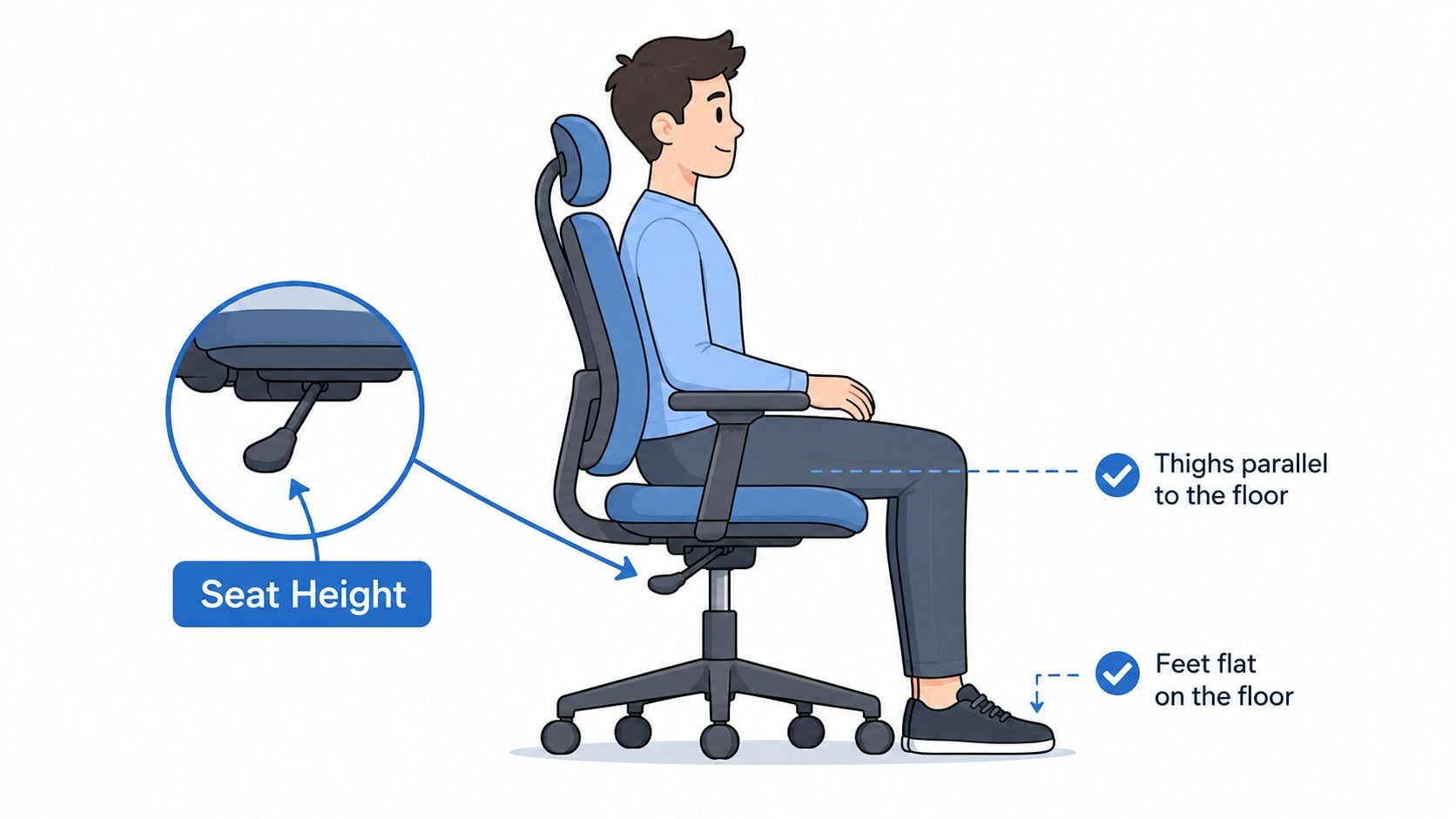
Begin with the seat height because it sets the foundation for everything else. The feet should rest flat on the floor or on a footrest, and the thighs should stay parallel to the floor Mayo Clinic office ergonomics. UNC also gives a more exact check, the top of the seat pan should line up with the bottom of the kneecap before the user sits, then the chair can be fine-tuned from there UNC office ergonomics.
If the knees sit higher than the hips, the seat is usually too low. If the feet do not make solid contact, the seat is too high. In a showroom, this is the moment to sit down, place both feet flat, and notice whether the legs feel supported without pressure at the front of the seat.
Then check seat depth
Seat depth is the amount of thigh support the chair gives before the front edge starts crowding the calf. UNC recommends leaving about three fingers to a fist's width between the back of the calf and the front edge of the chair when the back touches the backrest UNC office ergonomics. That gap matters because it gives the body room to sit back without cutting off comfort behind the knees.
If the chair is too deep and has no way to adjust, a cushion at the backrest can bring the body forward while keeping back support. When you are checking chairs in person, use this guide for measuring furniture so you can compare the seat depth against your leg length instead of guessing from the floor model alone.
Match recline to the task
Different tasks call for different amounts of recline. For typing, recent ergonomic guidance recommends a slight forward seat-pan tilt of about 5° to 10° for short, focused keyboard work task-based chair setup guide. For reading, planning, or taking pressure off the body between tasks, a more relaxed recline usually feels better.
That is why a chair should let you test motion, not just static sitting. On a showroom floor, sit upright, shift slightly forward, then lean back and notice whether the chair supports you without forcing your shoulders to work. The right range feels like the chair is following your posture, not fighting it.
Use the right range as the anchor
Public-health guidance places a good seat height in the 38 to 56 cm range, or 15 to 22 in., with the feet flat and the body supported public-health chair standards summary. Seat depth should be no deeper than 43 cm, or 16.9 in., if it is fixed, or include 43 cm if it is adjustable, with a rounded front edge for comfort public-health chair standards summary.
Those numbers are helpful, but the body still makes the final call. If the seat fits on paper and still presses behind the knees or leaves the back unsupported, the chair is not doing its job. The easiest test is to sit as if you were starting a real work session, not posing for a quick fit check, then see whether your feet stay planted, your thighs feel level, and your lower back can relax.
Must-Have Features and Red Flags When Choosing a Chair
A chair can feel fine for a short sit and still fail once the workday stretches on. That is why feature lists matter. The right adjustments give the body options, while missing adjustments usually make one area of the body compensate for another.
A good showroom test starts with the parts of the chair that change. Sit down and check whether the chair can match your legs, lower back, shoulders, and desk height without forcing a compromise. If the chair only works in one position, it may look comfortable but still leave you shifting, bracing, or reaching by the end of the day.
What to look for
- Adjustable seat height. The chair should match the user's legs instead of making the legs adapt to the chair.
- Adjustable lumbar support. This helps the lower back stay supported where the curve is.
- Adjustable armrests. Arms that rise, lower, or move inward can reduce shoulder strain.
- Seat-depth slider. This keeps the front edge from crowding the calves.
- Tilt tension and lock. These controls let the user move without feeling like the chair is fighting back.
- A stable base with casters suited to the floor. Movement should feel controlled, not wobbly.
What to watch out for
A frame built as if one size fits everyone is the first warning sign. It usually means the chair was designed around a narrow body type, not a range of users. Fixed armrests can be just as frustrating, because they may sit too high for relaxed shoulders or too low to offer real support.
Scooped seats with hard front edges can press behind the knees, especially during longer sitting periods. Short warranties can also signal that the chair was not built for long use. Foam that collapses quickly is another problem, because comfort disappears once the padding gives out.
Buyer's filter: if the chair makes several comfort claims but offers very few real adjustments, it is usually putting appearance first and fit second.
For a broader home office shopping lens, the home office furniture buying guide helps connect the chair to the rest of the room. A good seat still has to work with the desk, floor, and storage around it.
How to Shop for an Ergonomic Chair at Tip Top Furniture
A showroom visit changes the process. Instead of guessing from photos, the buyer can sit, reach, recline, and check whether the chair works with the body. That's especially useful for shoppers in Freehold and across the Greater Albany Capital Region who want a real try-before-you-buy experience before bringing home a chair for daily use.
The practical test is straightforward. Sit all the way back, check whether the lower back feels supported, and see if the elbows rest naturally without the shoulders lifting. Then raise or lower the chair, test the recline, and notice whether the seat still feels stable when the body shifts. Those are the moments where a spec sheet becomes a real decision.
Tip Top Furniture & Mattresses also offers custom ordering for shoppers who need a better size, finish, or coordinated look with the rest of the room. Its professional design services, available since 1984, can help with full-room planning, and the Synchrony Home Card financing option can make a better-fitting purchase easier to manage. For shoppers building a full setup, the office chairs selection is a natural place to start.
A showroom visit can also connect the chair to the bigger project. That includes home office layout, flooring, and other furniture choices that need to work together visually and functionally. When the room is planned as one system, the chair doesn't feel isolated from the rest of the house.
Daily Posture Checklist and Common Questions
A simple checklist can keep posture honest during a normal workday.
- Feet flat.
- Thighs parallel.
- A small gap behind the knees.
- Lumbar support in the lower-back curve.
- Shoulders relaxed.
- Elbows near a right angle.
- Screen at eye level.
That list works best when it sits where the eyes already go, like near the monitor. The point isn't perfect stillness. It's reducing the small slips that creep in after an hour or two of focus. For layout ideas that support the whole setup, the home office desk setup guide can help tie the chair to the desk and screen.
A few common questions come up often. Standing and stretching during the day helps break up long sitting stretches, especially when the chair or task keeps the body in one position for too long. A footrest is worth considering when the chair can't go low enough for the feet to rest flat. Drafting chairs and kneeling chairs can suit specific tasks, but they're not a universal fix. A quality ergonomic chair should be built for long use, not quick replacement.
The easiest way to know whether the setup is working is to notice the body after the session, not just during it. If the shoulders stay down, the lower back stays supported, and the legs don't feel crowded, the chair is doing its job.
Tip Top Furniture & Mattresses can help shoppers compare chair comfort in person, match a chair to the rest of a home office, and plan around real measurements instead of guesses. For anyone in Freehold or the Greater Albany Capital Region who wants a more comfortable setup, visit Tip Top Furniture & Mattresses and test the options before bringing one home.