How to Choose a Home Office Desk for Two


One person is trying to finish a video meeting while the other spreads paperwork across the only clear corner of the desk. A charging cable crosses the mouse pad, the chairs keep bumping, and neither person has enough room to settle in. The problem isn't necessarily the room's size. The furniture may be asking two people to share a workstation designed for one.
A home office desk for two should give each person an independent place to work, even when the furniture looks like one coordinated piece. For Capital Region households, that means choosing around actual schedules, equipment, and room responsibilities, not just finding a long tabletop.
Why Two-Person Desks Need More Planning
Adding another chair is easy. Creating a shared office that works during a busy weekday takes more thought.
A laptop user answering occasional emails needs a different arrangement from someone working with multiple monitors and printed documents. Put those people together without planning, and the person with more equipment can gradually take over the shared surface.
Equal halves aren't always useful halves. Each workstation needs enough space for its particular tasks, along with access to lighting, charging, and storage that doesn't depend on the other person moving.

Independence matters more than symmetry
The strongest starting point is a simple household discussion about how each person works.
- Equipment ownership: Each person needs a defined place for screens, input devices, paperwork, and personal electronics.
- Daily interruptions: Calls, meetings, and concentrated work should influence the arrangement before appearance does.
- Individual control: Neither person should have to disturb the other to adjust a light, retrieve a file, or leave the desk.
- Shared expectations: The household should decide which surfaces and supplies are communal and which aren't.
Buying principle: A shared desk succeeds when neither person has to negotiate for the space needed to do ordinary work.
Tip Top's family-owned Freehold showroom serves households throughout Albany, Schenectady, Troy, Greene County, and the wider Capital Region. A useful furniture conversation starts with those household routines rather than a preferred desk style.
Plan for the room, not just the work surface
The finished arrangement also needs to coexist with doors, storage, and other household activities. An impressive desk isn't a good purchase if somebody must squeeze past a seated partner to reach the closet.
A practical recommendation is to prioritize independent work zones, clear circulation, and manageable interruptions. Style comes next, once both occupants can use the room comfortably.
Measure the Room Before Choosing the Desk
A desk can fit perfectly along a wall and still be wrong for the room. The missing measurements usually involve the people sitting at it, the furniture around it, and the paths everyone uses.
Start with a scaled floor plan. Tip Top's guide to measuring a room for furniture can help organize the information before a showroom visit.
Measure the occupied footprint
Record the usable wall length, but don't stop there. Mark windows, outlets, heating equipment, door openings, and furniture that will remain.
Then test the arrangement as though both people were already working:
- Chair movement: Trace where each chair travels when its occupant sits down, pulls back, and stands.
- Door swings: Check room doors, closets, cabinets, and nearby furniture doors.
- Drawer access: Allow drawers to open without striking chair arms or blocking another person's legs.
- Walking routes: Preserve a practical route through the room while both workstations are occupied.
- Delivery access: Note narrow turns and openings that could affect bringing the furniture inside.
Painter's tape can make the proposed desk footprint easier to understand. Existing chairs can then stand in for the occupied workstations, exposing conflicts that a wall measurement won't reveal.
Compare usable width, depth, and height
For a concrete comparison, a 150 cm desk provides about 75 cm per person, while a 180 cm desk provides about 90 cm per person, before equipment and accessories reduce that space; an ergonomic workstation-design reference also lists typical table dimensions of 150–180 cm long, 70–90 cm deep, and 72–76 cm high.
Those dimensions are comparison points, not a guarantee of fit. A central drawer pedestal, thick supports, or oversized monitor bases can make an apparently generous desk feel cramped.
For simultaneous computer work, the larger option deserves serious consideration. A smaller shared surface is a more reasonable candidate when use is light, equipment is compact, or the occupants rarely work together.
Depth and legroom deserve the same attention as width. The purchase should accommodate the equipment layout without pushing either chair away from its natural working position.
Two-person desk layout comparison
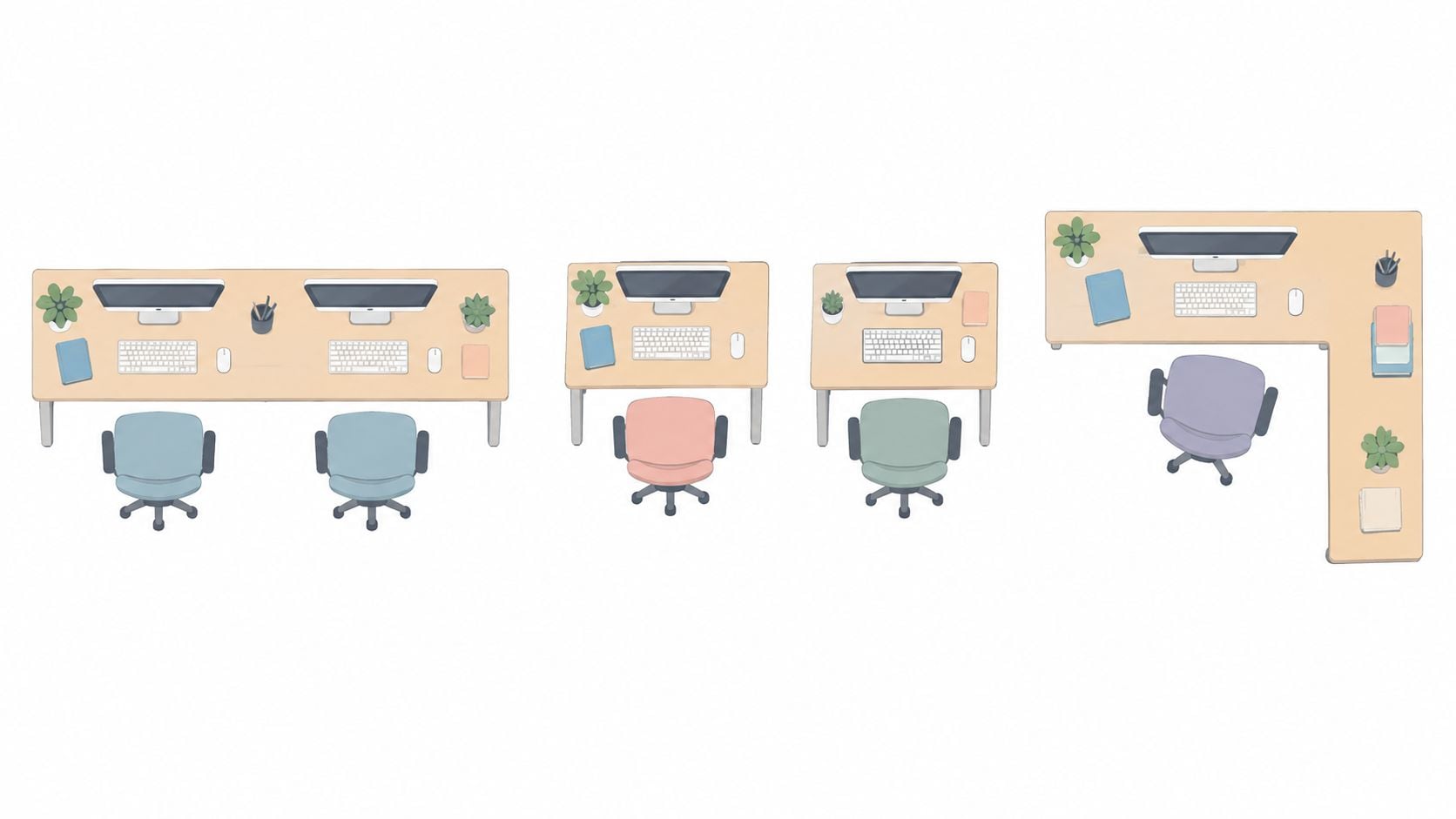
| Layout | Personal space | Privacy | Best fit | Main trade-off |
|---|---|---|---|---|
| Continuous desktop | Connected zones with a shared boundary | Limited separation | Frequent collaboration along an open wall | Equipment can encroach on the neighboring zone |
| Separate desks | Clearly defined individual stations | More placement options | Different schedules and work requirements | More pieces to coordinate |
| L-shaped arrangement | Distinct work directions when properly planned | Some visual separation | Suitable corners and occasional collaboration | The corner can become contested space |
Before choosing a layout, the household should bring both room measurements and a description of typical workdays to a Tip Top design consultation. Those details make a furniture recommendation far more useful than a photograph of an empty wall.
Compare Continuous and Separate Desk Layouts
The longest desk isn't automatically the strongest choice. The layout should follow the relationship between the workdays, especially when one person needs quiet and the other spends much of the day speaking.
Consider a couple who collaborate on household paperwork but have unrelated jobs. Their shared evening tasks may favor sitting together, while their working hours may call for more separation.
A continuous desktop favors easy collaboration
A continuous surface makes sense when both occupants enjoy working alongside each other and regularly exchange documents or discuss projects. It can also create a restrained, coordinated furniture arrangement along a suitable wall.
Its weakness is the shared boundary. A wide screen cluster, document pile, or spreading project can push the neighboring person outward.
A desk should be rejected if its attractive arrangement depends on either occupant sitting diagonally. Extra tabletop at the far end doesn't compensate for an awkward position at the keyboard.
Separate desks favor different work patterns
Separate desks are the stronger recommendation when occupants have different equipment requirements or need different orientations. One station can face a wall while the other occupies another part of the room.
They don't need to match exactly. Coordinating finishes can provide a consistent appearance while allowing different storage arrangements or work-surface sizes.
Separate furniture doesn't create acoustic privacy by itself. If simultaneous confidential calls are routine, the household should plan access to another enclosed space rather than expect furniture placement to solve the entire problem.
A visually separated workstation can reduce distraction, but a low divider isn't a substitute for a private room during sensitive calls.
An L-shaped arrangement needs clear ownership
An L-shaped layout can suit occupants who want some separation while remaining close enough for conversation. The useful arrangement gives each person a distinct working direction rather than placing both chairs around the inside corner.
That corner needs an assigned purpose. Shared supplies may belong there, but neither person's main workstation should depend on reaching across it.
Before committing, compare the alternatives using Tip Top's room-layout planning guidance. Check where each camera points, what each occupant sees while concentrating, and whether either person must pass behind the other repeatedly.
The deciding question isn't which layout holds the most furniture. It's which arrangement lets both people work without making the room difficult to use.
Set Up Two Ergonomic Work Zones
Once the desk arrives, decoration can wait. Both occupants should first sit down with their actual equipment and adjust their stations independently.
A matching appearance is less important than a comfortable working position. Different users may need noticeably different chair and screen settings on the same surface.
Start with seating and elbow height
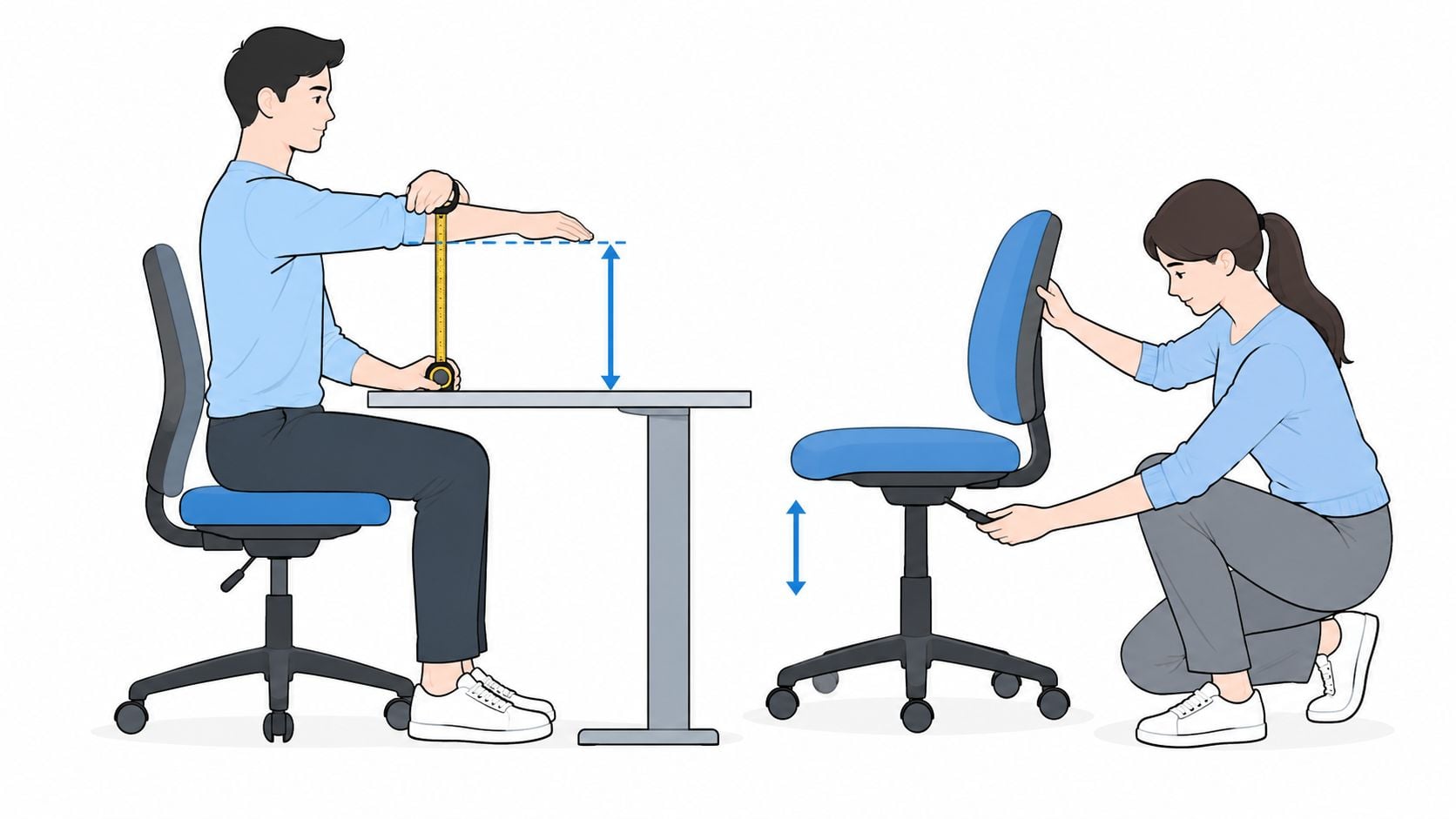
Each occupant should sit with relaxed shoulders and measure the height of the seated elbows. That establishes a practical starting point for the relationship between the chair, keyboard, mouse, and work surface.
For a fixed-height desk, the shorter person's fit deserves particular attention. Adjustable seating may help accommodate differences, but raising a chair shouldn't leave the occupant's feet unsupported.
Tip Top's ergonomic home-office furniture guidance provides a useful starting point for discussing furniture fit. The important test remains whether both people can use the selected arrangement, not whether the desk carries an ergonomic description.
Position equipment around each occupant
Set up each station in a deliberate sequence:
- Center the primary screen: Place it directly in front of its user rather than between the occupants.
- Establish viewing distance: Occupational-safety guidance recommends placing a monitor at least 20 inches from the eyes, with a preferred range of 20–40 inches, according to OSHA's desk and workstation guidance.
- Adjust screen height: Position the display so its top is at or slightly below eye level, then check whether the user can read comfortably without tilting the head.
- Align input devices: Keep each keyboard and mouse with its own chair, at a working height that allows relaxed shoulders and neutral wrists.
- Test ordinary tasks: Typing, reading documents, using a mouse, and joining a call should all work without borrowing space from the neighboring station.
Separate monitor arms are worth considering when screen-height requirements differ. Before purchase, confirm compatibility with the displays, desktop construction, and available mounting space.
Test different users rather than copying settings
Consider a household with a taller partner and a shorter partner. This is a planning example, not a customer case study.
The taller occupant may need a higher screen, while the shorter occupant needs a different chair position and foot support. Independently adjustable monitor arms and seating allow those differences without forcing the pair into identical settings.
Both people should work briefly at the completed stations before accessories are added. If someone repeatedly leans forward, turns toward a screen, or reaches around a neighboring device, the layout needs adjustment.
A visually spacious desk still fails if either person must work around the other person's equipment.
Add Storage and Cable Management Without Cluttering
A shared desk often becomes crowded because the household never decides where things belong. Papers land in the middle, chargers migrate, and the shared surface becomes overflow storage.
The answer isn't to add organizers everywhere. It's to assign storage according to the tasks each person performs and keep the working areas available for work.
Give everyday objects a permanent home
Consider a document-heavy worker sharing with someone who uses multiple screens. The first person needs accessible files and a place for active paperwork; the second needs equipment clearance and an orderly charging arrangement.
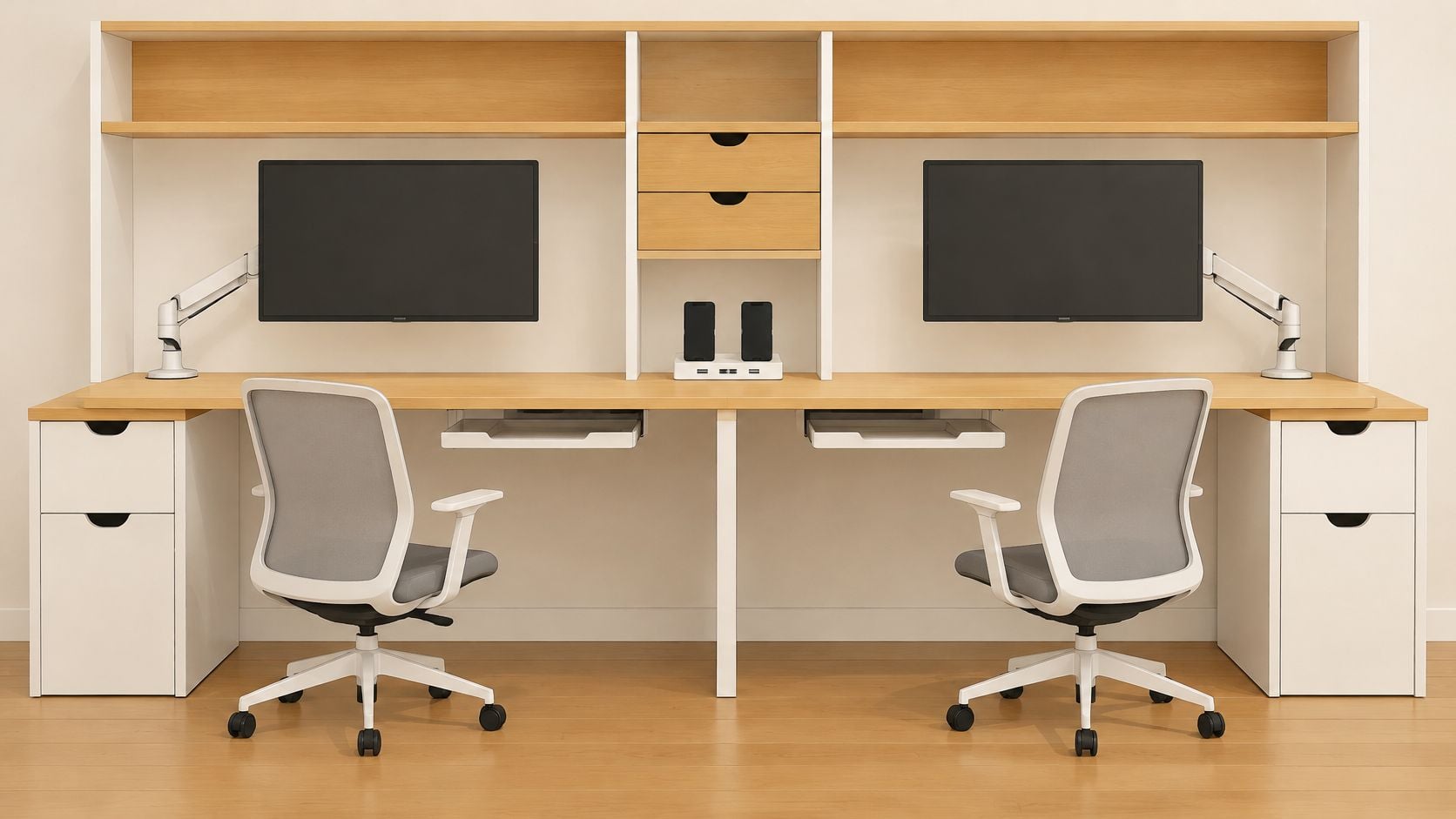
A shared cabinet can support both, provided its interior has assigned areas. Without that agreement, the cabinet just moves the competition for space behind a door.
- Personal drawers: Assign separate locations for stationery, notebooks, and small electronics.
- Active-paper storage: Keep current documents near the person using them, not in a pile across the boundary.
- Shared shelves: Reserve these for reference material or supplies both occupants use.
- Charging locations: Give portable devices a predictable landing place away from mouse movement.
- Task lighting: Position lamps so each person can control local light without occupying the neighboring work area.
Tip Top's home-office storage ideas can help households consider closed cabinets, shelving, and supporting furniture rather than expecting desk drawers to hold everything.
Route cables before filling the drawers
Power strips, monitor cords, and charging leads should have planned routes. Under-desk trays or suitable cable channels can help, but they must not occupy knee space or interfere with moving furniture.
Check access as well as concealment. A power arrangement that looks tidy but requires crawling behind the other occupant whenever a device is unplugged isn't practical.
Installation check: Both chairs should move normally without catching cables, striking storage, or pulling against connected equipment.
Desk-mounted accessories also need room. Monitor-arm clamps, lamps, and cable openings can compete along the back edge, so their positions should be considered together.
Accessories aren't automatically included with a desk. Their compatibility and installation requirements should be confirmed separately.
Tip Top can help coordinate furniture, décor, and flooring as a complete room project. That coordination is most useful when the storage plan is settled first, leaving decorative objects to occupy genuinely spare space rather than essential working space.
Use the Room Beyond Work
A guest room can become an office during the week without needing to look permanently occupied by work. The furniture choice changes once the household expects the room to welcome visitors, support crafts, or provide somewhere quiet to read.
Consider a couple working opposite schedules. One finishes early and closes away paperwork; the other returns later and needs a workstation that's ready without unpacking the entire room.
Make the evening reset realistic
The useful arrangement gives each occupant a reliable place to put unfinished work. Closed storage can hide documents, while an assigned charging location keeps devices ready without leaving them scattered across the room.
A reset should involve ordinary tidying, not moving heavy furniture every evening. If the arrangement is inconvenient, the household is likely to leave the office permanently assembled.
- Closed storage: Work materials can remain organized without dominating the room visually.
- Manageable chairs: Seating should tuck away or move readily when the room changes purpose.
- Adaptable equipment: Monitor mounts and other accessories should support the planned transition, with compatibility checked beforehand.
- A restrained footprint: The desk should leave enough room for the room's non-work activities.
A visually lighter arrangement is often a better recommendation than an executive-style desk in a multipurpose room. That doesn't mean choosing flimsy furniture. It means avoiding unnecessary bulk, oversized storage pedestals, and surfaces the household won't use.
Plan the guest room as a guest room too
In an office that also accommodates visitors, the guest bed, bedside access, and luggage space deserve consideration from the start. Work equipment shouldn't have to migrate onto the bed whenever somebody needs a clear surface.
Matching the desk finish to surrounding furniture can help the workspace feel intentional. Tip Top's custom options, décor, and flooring selection allow the office area to coordinate with the room's other responsibilities.
For households updating the guest sleeping area as well, the showroom also offers USA-made mattresses and personalized sleep-matching support. Comfort, durability, and value belong in that discussion, separately from the desk decision.
The right home office desk for two supports the household after working hours too. A modest arrangement that resets easily can be more useful than a larger desk that prevents the room from serving any other purpose.
Choose Custom Ordering and Local Expert Support
A standard desk is enough when its proportions, supports, storage, and finish suit the room without compromise. Custom ordering becomes worth considering when a household keeps encountering the same obstacle across otherwise suitable options.
That obstacle might be an unusual wall, a finish that needs to coordinate with existing furniture, or storage that must accommodate different working habits. Customization should solve a specific problem, not just add complexity.
Make customization purposeful
Tip Top's custom furniture service reflects its family-owned Freehold history since 1978, professional design services since 1984, and selection from more than 50 trusted manufacturers. That local support gives Capital Region homeowners somewhere to discuss dimensions, wood choices, finishes, and the feasibility of a particular design.
A photograph or sketch can help communicate the intended result. Available changes should be confirmed for the particular furniture under consideration rather than assumed across every collection.
For shoppers seeking solid wood and heirloom-oriented construction, Amish furniture handcrafted in the USA is another option to discuss. Finish selection should be considered alongside the nearby floor, cabinetry, and other furniture, not in isolation.
Bring a practical buying checklist
A productive showroom visit starts with information the adviser can use:
- Room information: Measurements, photographs, door locations, and the proposed furniture arrangement.
- Equipment requirements: Monitor counts, device dimensions, and any mounting needs.
- Work routines: Overlapping hours, call requirements, and expectations for privacy.
- Storage priorities: Files, supplies, electronics, and materials that must disappear after work.
- Finish preferences: Existing wood tones, flooring samples, or photographs of furniture staying in the room.
- Purchase logistics: Delivery needs, budget priorities, and interest in financing or clearance furniture.
Flexible financing can help organize the purchase, while clearance pieces may offer quality furniture at a lower cost. Current availability, condition, delivery arrangements, and payment terms should be discussed before a decision.
A free online room planner can also help households compare a proposed arrangement before visiting. The final choice should satisfy the working requirements first, with local design support helping connect function, finish, and the rest of the home.
For Albany, Schenectady, Troy, and Greene County homeowners planning a shared office, Tip Top Furniture & Mattresses offers home-office furniture, custom-order options, and local design support at its Freehold, NY showroom. Households can use the free online room planner, bring their measurements for a design consultation, and ask about flexible financing, delivery, and current clearance options.